Cloud Phone vs VPN: Latency, Price, Privacy and Game Rules
A cloud phone runs your apps on a rented Android phone in a data center; a VPN reroutes your own traffic. Compare latency, price, privacy and game rules.
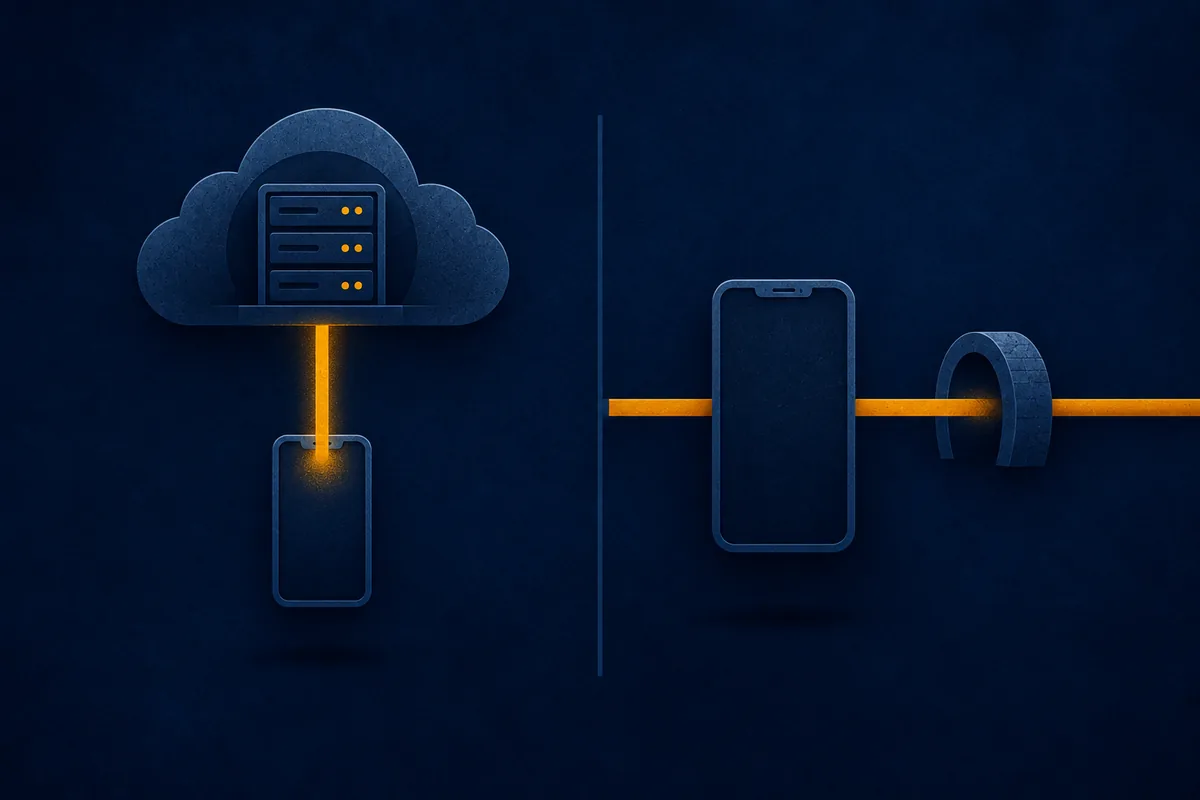
Quick answer: a cloud phone is a whole Android phone you rent in a data center and control through a video stream, so your apps run on the provider’s hardware. A VPN leaves your apps on your own phone and only sends their traffic through an encrypted tunnel. A cloud phone suits extra accounts and apps that must run around the clock, but it adds lag to every tap, puts everything on it within the provider’s reach, and is often restricted by games’ terms. A VPN suits protecting your own connection.
Cloud phone vs VPN at a glance
| Cloud phone | VPN | |
|---|---|---|
| What it is | A virtual Android phone in a data center, streamed to your screen | An encrypted tunnel from your device to a VPN server |
| Where your apps run | On the provider’s servers | On your own phone or computer |
| Latency | Every tap goes to the data center, and the screen comes back as video | Taps stay on your device; only network traffic detours via the VPN server |
| Price | Per phone, billed by the minute, day or month; the bill grows with every phone and hour | Usually one subscription for your own devices; longer plans cost less per month |
| What the provider can see | Technically, everything on that phone: apps, accounts, messages, files | Your IP address and the sites and servers you reach, not the HTTPS content |
| Game terms | Often restricted: emulators, unofficial software, extra accounts, faked location | Often not named, but some games forbid disguising where you live |
| Good for | Extra accounts, apps running 24/7, testing Android apps | Public Wi-Fi, hiding your IP address, privacy on your own device |
What a cloud phone is
A cloud phone is an Android phone that lives in a data center instead of your pocket. In GeeLark’s words, cloud phones “are just like regular Android phones, but they live online instead of in your hand.” You open the provider’s app or website, see the phone’s screen and tap on it. As AWS describes for streamed Android games, only your input travels to the server, and the server sends rendered frames back to your screen.
Providers include Redfinger, UgPhone, VMOS Cloud, LDCloud, GeeLark and DuoPlus. Their own pages show what people buy them for:
- Apps that run 24/7. UgPhone advertises “24/7 Cloud Online to AFK”. The cloud phone keeps running while yours is off.
- Multiple accounts. Redfinger advertises running “parallel or multiple accounts”, and GeeLark gives each cloud phone “its own unique device info setup”.
- A different region. UgPhone’s plans list servers in places such as Hong Kong, Germany, Japan, the USA and Singapore.
- Testing and automation, which GeeLark and DuoPlus both advertise.
Cloud phone vs emulator: Google’s Android Emulator “simulates Android devices on your computer.” A cloud phone moves that virtual device into someone else’s data center. Marketing blurs the line: Redfinger calls itself the “Best Cloud Android Emulator”. Either way, to a game it isn’t your own phone.
What a VPN is
A VPN doesn’t give you a second device. Your apps keep running on your phone, and the VPN changes the path their traffic takes. In the EFF’s words, a VPN “routes all your web traffic through an ‘encrypted tunnel’ between your devices and the VPN server,” and to a website “it appears your location is wherever the VPN server is.”
That hides your IP address from the sites and apps you use, and hides your traffic from your internet provider and whoever runs the Wi-Fi. Our guide to what a VPN actually hides covers the limits. On Apple devices, iCloud Private Relay does part of this job for Safari; see iCloud Private Relay vs VPN.
Latency: a video stream vs a detour
Cloud phone. The app runs in the data center, so everything you see is video. A 2017 study of cloud gaming, which works the same way, describes the server sending back “rendered, captured, and encoded images” that your device decodes and displays. The researchers call latency “the main challenge for cloud gaming.” On a cloud phone that round trip applies to every tap, even scrolling a menu.
So the data center has to be close. NVIDIA’s GeForce NOW cloud gaming service requires “less than 80ms of network latency from an NVIDIA data center.” In an online game, the cloud phone then has to reach the game’s own servers too, as the AWS article notes for multiplayer titles.
VPN. The game runs on your phone, so taps and menus respond locally. Only the traffic between the game and its servers detours through the VPN server, and distance sets the cost. In Cloudflare’s example, a server in Columbus, Ohio answers users about 100 miles away in roughly 5–10 milliseconds, and users in Los Angeles, about 2,200 miles away, in closer to 40–50 milliseconds. A nearby VPN server adds little; one on another continent adds a lot. Our guide to why a VPN is slow shows how to measure it.
Neither one has a fixed number, so test on your own connection.
Price
Cloud phones are priced per phone and per unit of time, so the bill grows with every extra phone and every hour it runs. GeeLark charges by the minute by default and also rents a device by the month for heavy use. VMOS Cloud sells cloud phones by the day, or by the minute with a daily cap. Running several phones around the clock multiplies the cost.
VPNs are usually one subscription that covers your own devices, and a one- or two-year plan costs less per month than paying month to month. Prices for both vary by region and change with promotions, so check the provider’s own page before you buy.
Privacy: who can see what
Cloud phone. The provider runs the hardware, the Android system and the storage your apps write to. Everything you do on that phone happens on its computers, so the provider can technically reach all of it: the apps, the accounts you sign in to, your messages and your files.
Privacy policies say what providers choose to collect. VMOS Cloud’s names “cloud phone usage details, such as running applications and usage duration.” Redfinger’s covers app installs, launches, play time and “app network activity”. NIST’s cloud guidance names the general risk: moving data to a cloud provider “expands the circle of insiders” to the provider’s staff and subcontractors. Treat a cloud phone like a shared computer, and don’t sign in to your main email, bank or password manager on it.
VPN. The EFF notes that while a VPN hides your browsing from your internet provider, “it’s all visible to the VPN provider.” HTTPS limits what “all” means. On encrypted sites, parties along the path can usually see the domain names you visit and when, but not the pages on those sites, your login name or the messages you send. So a VPN provider sees your IP address and the sites and servers you connect to, while HTTPS content stays encrypted.
In both cases you’re trusting a company. A VPN provider sees where your traffic goes; a cloud phone provider holds the whole phone.
Game terms of service
Rules differ by game, so read the terms of the one you play. Here’s what three major publishers’ terms say as of November 2026.
Supercell (Clash of Clans, Clash Royale, Brawl Stars). Its terms of service forbid using “cheats, exploits, automation software, emulators, bots, hacks, mods or any unauthorized third-party software designed to modify or interfere with the Service.” They don’t mention VPNs.
Pokémon GO. Niantic is now Scopely Explore, and its terms of service, last modified on July 15, 2026, count as cheating “Accessing Services in an unauthorized manner (including using modified or unofficial third party software)”, “Playing with multiple accounts for the same Service”, and “Using any techniques to alter or falsify a device’s location (for example through GPS spoofing)”. A cloud phone in a data center can’t report where you are, so providers offer location settings instead: DuoPlus lists “Global GPS, SIM Card, and Base Station Info”. The terms don’t mention VPNs, which change your IP address, not your GPS position.
PUBG Mobile. Its EULA, last updated on March 17, 2026, forbids third-party offerings “such as hosting”, “emulation” and “tunneling” that the publisher doesn’t provide. It also bans using “IP proxying or other methods to disguise the place of your residence, whether to circumvent geographical restrictions on the Services or for any other purpose.” That covers VPNs too, so disconnect yours before you open the game.
The pattern: cloud phones and emulators are often named or plainly covered. VPNs go unmentioned in two of these three, but PUBG Mobile forbids anything that disguises where you live. All three let the publisher suspend or end your access for a breach.
Can you use both?
You can, but they protect different parts of the path. A VPN on your own phone encrypts the link between you and the cloud phone provider. It does nothing for the cloud phone itself, whose traffic leaves from the provider’s data center.
Which one do you need?
- A second account, or a game that runs while your phone is off. That’s what cloud phones are sold for, but read the game’s terms first: the ones above forbid multiple accounts, emulators or both.
- Protection on public Wi-Fi, or a hidden IP address. That’s a VPN’s job, and your apps, accounts and files stay on your own device.
- Lower lag in a game. Neither is a guaranteed fix. If a game feels slow with a VPN on, try a nearer server or play with it off.
- Appearing in another region. A VPN changes the location websites see. For games, check the terms first, because some forbid exactly that.
If a VPN is what you need, BlueHammer VPN runs on iPhone, Android and Mac and connects with one tap. On iPhone and Mac it offers WireGuard and IKEv2, and it has a kill switch.
Common questions
What is a cloud phone?
A cloud phone is a virtual Android phone that runs in a provider's data center and is streamed to your screen. You tap on the stream, your input travels to the server, and the phone sends its screen back as video. Providers include Redfinger, UgPhone, VMOS Cloud, LDCloud, GeeLark and DuoPlus, and people use them to run extra accounts or keep apps running around the clock.
Is a cloud phone safe to use?
It depends on how far you trust the provider. The company runs the whole phone, including its storage, so it can technically reach the apps, accounts, messages and files on it. Read its privacy policy before you sign up, and don't sign in to your main email, bank or password manager on a cloud phone.
Is a cloud phone or a VPN better for gaming?
Neither is a guaranteed improvement. On a cloud phone, every tap travels to the data center and the screen comes back as compressed video, so input lag depends on how far away that data center is. With a VPN, the game runs on your own phone and only its network traffic detours through the VPN server, so a nearby server adds little. Several major games' terms also restrict emulators and third-party hosting.
Can I get banned for using a cloud phone or a VPN?
Yes, if it breaks the game's terms. As of November 2026, Supercell's terms forbid emulators; Pokémon GO's terms forbid unofficial software, multiple accounts and faked locations; and PUBG Mobile's EULA forbids third-party hosting and emulation as well as IP proxying that disguises where you live. Supercell's and Pokémon GO's terms don't mention VPNs. Check the terms of each game you play.
What's the difference between a cloud phone and an emulator?
An emulator runs a virtual Android device on your own computer. A cloud phone runs one on a provider's servers and streams it to you, so it keeps running when your own device is off. Some providers market their cloud phones as cloud emulators, and to a game neither one is your own phone.
Recommended next step
Make everyday Mac care easier with BlueHammer
Clean up storage, organize files, browse privately, and keep everyday protection in one place.
Explore BlueHammer VPN